Reproducing GPT2-125M
Summary
This is a detailed account of Reproducing GPT2-small (GPT2-125M) on Open-source Frameworks, Datasets and publicly available GPU cloud infra.
The overall stack is :
GPU Infra: Runpod
Dataset: OpenWebText (via HF/datasets)
Training: HF Trainer, Pytorch, Accelerate
Eval: LLM-eval Benchmark
Monitoring: Wandb
Conclusion:
- Reproduced GPT2-125M open weights off HuggingFace for Hellaswag accuracy, which also matches Kaparthy’s LLM.c reproduction.
- However, unable to reproduce other benchmarks such as OpenAI Lambada and perplexity on WikiText.
Goals
The immediate goal is to reproduce a Baseline GPT2 Model.
The Meta-goal, is to figure out a good set of hyperparameters and viable hobbyist training setup for the baseline GPT2 Model. Freeze this set of hyperparameters and do ablations on the model architecture for pre-training.
Training Infrastructure
I chose to use Runpod for historical reasons and also because I think they offer the best raw pricing for hobbyist grade second-tier GPUs. There are many alternatives like Lambda labs, aws, google vertex, etc.
-
Basic Setup. Create account, setup billing and create ssh keys in Runpod Interface. These are SOPs for working with any cloud provider, nothing special here. Copy private key into ~/.ssh/
and ssh directly into the runpod terminal. -
Create Volume. This is also standard across any cloud provider, and is used to persist all data and scripts when spinning up new VMs. The main decision is which data center to create the volume in. Different data centers have different availability of compute resources, so the volume should be created where there are high availability of the target machines. The amount of volume is not that critical because you can always start with a smaller volume and update this later.
-
Create Virtual Machine (VM) from existing base image (“Template”). It’s important to choose > Pytorch 2.1.0, because flash-attn needs cuda>12.6. For e.g.,
runpod/pytorch:2.8.0-py3.11-cuda12.8.1-cudnn-devel-ubuntu22.04, orrunpod/pytorch:2.4.0-py3.11-cuda12.4.1-devel-ubuntu22.04. -
Prepare Start up Scripts for new VMs. Everytime the VM is restarted, run a basic setup Script on root, because runpod spins up a new container each time. Python packages and installations can be installed once as long as the are package manager (I used miniconda) saves it to the mounted volume (on /workspace) which can persist across the creation of new VMs. There are many known issues related to building the .whl file for Flash Attention. It’s easier to find the .whl from the assets releases and do a pip install .
-
Optional Cloud Storage. Create cheaper storage on AWS or other cloud options so that I dont have to persist the runpod volume. Runpod provides GUI-mouse click for Syncing between the Runpod Volume and popular storages like S3 Storage/Google Drive/Dropbox (although this is also by rsync on the command line). A runpod volume of 500-1000Gb costs $25-50 a month which is very pricey and I suspect how they makes most of their money.
Note: A detailed comparison of GPU Cloud platforms is complicated because there are many things to consider besides raw pricing, such as integration with other platforms, availability of the GPUs, ease of setup and access, cold-start time etc, interconnectivity of GPU cards, documentation and community support.
Multi-GPU Training
- HuggingFace Accelerate. HuggingFace accelerate is a wrapper around torch.distributed and torch.xla, and advanced Training Frameworks like FSDP and DeepSpeed without having to modify code inside the main functions.
Accelerate (Key) Configs:
compute_environment: LOCAL_MACHINE
deepspeed_config:
zero_stage: 1
distributed_type: DEEPSPEED
downcast_bf16: no
mixed_precision: bf16
-
DeepSpeed. I mainly rely on deepspeed:ZeRO stage 1 which partitions optimizer states across GPUs to reduce memory usage during distributed training.
-
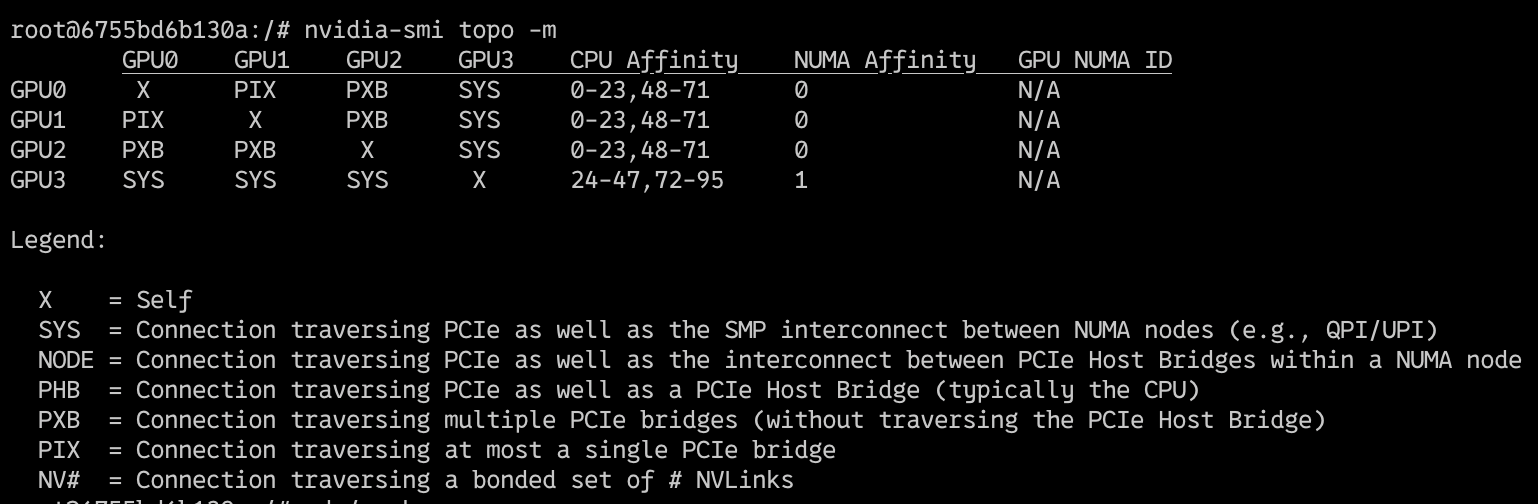
Underlying Hardware Connections. On cloud infra, even though “multiple GPUs” are selected and they become visibly “available” (via
nvidia-smi) for use on the single virtual machine, they may not actually be on the same physical device/server. There are multiple avenues for GPU cards inter-connection links. The output ofnvidia-smi topo -mshows us the topography of the NVIDIA-GPU Network connections.
-
System is definitively a dual-socket CPU server (or has at least two NUMA domains), which is very common for high-end GPU servers.
-
SYS (System Fabric): Data travels through the CPU’s PCIe root complex and potentially through system memory. It’s generally slower than direct GPU-to-GPU links.
-
PXB (PCIe Bridge): This indicates communication through a PCIe bridge which can add a slight latency compared to direct PCIe paths (or NVLink which is even faster). However, it’s still good because it operates within the same system.
-
NUMA: The system has at least two NUMA (Non-uniform Memory Access) nodes 0 and 1, and the GPU0 is on NUMA0 while GPU1,2,3 are on NUMA1. Data has to traverse the inter-NUMA interconnect of the CPUs.
The implications of this GPU Interconnectivity (or lack of) is possible hanging or instability during multi-GPU training, preventing Peer-to-peer (P2P) GPU Communication from working correctly. This means we may not be able to rely on all of the NVIDIA Collective Communications Library (NCCL) optimisations.
Datasets
The two main open-source datasets available for pre-training are
-
OpenWebText, which is an open-source replication of the dataset that was used to train GPT2.
-
Fineweb, another dataset which is thought to be higher quality than Openwebtext. The size of Openwebtext vs Fineweb training set are not directly comparable, although Openwebtext and the Fineweb-edu/10B tokens are both in the range of ~40GB of data. Although the train time perplexity scores are not directly comparable, training on Fineweb achieves better scores on the downstream eval dataset.
Download Dataset to Disk. I first download to disk setting the cache_dir to avoid the latencies of streaming data over the network. For validation (not evaluation) during training, split 0.1% of the data. I could also use a separate dataset to check for overfitting, for e.g., the validation split of wikitext-103-raw but decided that this was better as a test set instead.
Preprocessing of Dataset
- WrapText for those sentences that are too long
- Filter out those that are either too short or too long. This includes the short segments that overflow (text-wrapped)
- Write a tokenizer function, which preprocesses the data into tokens and saves to disk so that there is no bottleneck at preprocessing during training.
- Save pre-tokenized dataset to disk for more efficient loading during training
import subprocess
from datasets import load_dataset, load_from_disk

ds_name = "HuggingFaceFW/fineweb-edu"  #openwebtext
min_len, max_len = 256, 512
res = subprocess.run(['nproc'], capture_output=True, text=True, check=True)
nproc = int(res.stdout.strip())

def tokenize_fn_default(examples):
	tokenized = tokenizer(examples['text'],
				truncation=True,
				max_length=max_len,
				padding='longest',
				return_overflowing_tokens=True)
	return {
		"input_ids": tokenized['input_ids'],
		"attention_mask": tokenized['attention_mask']
	}

ds = load_dataset(ds_name, name="sample-10BT", split=split)
tokenized_ds = ds.map(tokenize_fn_default, batched=True, remove_columns=ds.column_names, num_proc=nproc)

tokenized_ds = tokenized_ds.filter(lambda x: sum(x['attention_mask'])>=min_len, num_proc=nproc)

tokenized_ds.save_to_disk(f"corpus/tokenized_{ds_name}_{split}_pack{min_len}-{max_len}tokens_overflow")
After filtering there are 11B tokens:
import pyarrow.compute as pc
array = filtered.data.column('input_ids')
total = pc.sum(pc.list_value_length(array)).as_py() # 11007602548
Data Structures: The estimated amount of RAM the dataset needs to load into memory is 11GB for this dataset, and can be much larger for larger-scale LLM training. Modern dataset libraries (such as HF Datasets) uses Apache Arrow format (columnar memory layout), which allows zero-copy reads removing virtually all serialization overhead. Arrow treats datasets as a memory-mapped file from disk, and not loaded in memory. This means I can access chunks without having to read the whole file into memory, and allows multiple processes to access the data without moving or copying.
Models
It’s straightforward to initialise a Untrained Transformer from the configs. The default configs GPT2Config() are for 125M model.
import torch
from transformers import GPT2Config, AutoModelForCausalLM, AutoTokenizer
device = "cuda" # the device to load the model onto
gpt2config = GPT2Config()
model = AutoModelForCausalLM.from_config(gpt2config, torch_dtype=torch.bfloat16, attn_implementation="flash_attention_2")
tokenizer = AutoTokenizer.from_pretrained("gpt2")Quantisation: Training the model with torch.float16 results in degenerate weights. However, this isn’t the case with precision at torch_dtype=torch.bfloat16.
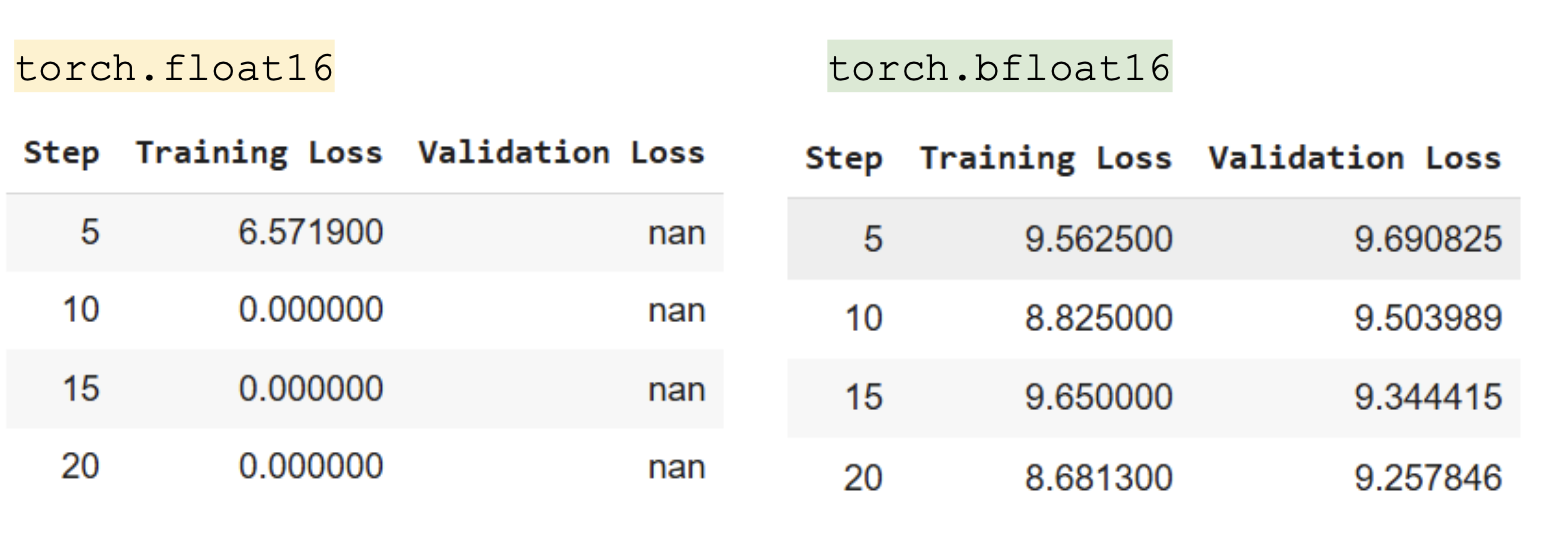
float16 has higher precision for small numbers but a smaller range, while bfloat16 has the same range as float32 (±3.39×10^38) but less precision. It’s possible that if I had better initialisation within the appropriate range, could enjoy better precision with float16.
Architecture: Although I will maintain the GPT2 architecture to get comparable results, there has been several advances in model architecture
- Position Embeddings; Absolute -> Rope).
- Position of NormLayer (PreNorm -> Multiple LayerNorms moving out of residual stream),
- Form Of Layer Norm (–> RMSNorm), Activation Unit (Gelu->SwiGLU)
- Removal of bias terms from FFN
- Dense Feedforward Network –> Mixture of Experts
Hyperparameters
I cannot afford to do large hyperparameter sweeps treating each hyperparameter as a blackbox. Instead I referenced known hyperparameter configs. The model architecture and the open weights for GPT2 is released, but many of the training hyperparameters and data for GPT2 were never released.
Evaluation
To standardise the setup for evaluation, I download the pre-trained model from huggingface, and benchmark it against llm-eval, which is an open-source reproducible evalution benchmark.
!lm_eval --model hf \
    --model_args pretrained=’openai-community/gpt2’,--max_length=512,truncation=True\
    --tasks lambada_openai,hellaswag,wikitext \
    --limit 100 \
    --device cuda:0 \
    --batch_size 8
Note: This is a more robust comparison approach than following numbers in the paper, as the evaluation setup differs. For instance, since our training only goes up to the context window of 512 tokens, to make comparison fair against the other pre-trained models, the evaluation examples were truncated to the max sequence length of 512.
Training and Logging Setup
Since the training is very standard and self-contained, I used HuggingFace trainer. HuggingFace trainer has a ridiculous number of arguments, hence I maintain my sanity by categorising the arguments as either batch, optimizer, logging, or init arguments and combining these together later.
import wandb
from transformers import GPT2Config, AutoModelForCausalLM, AutoTokenizer
from transformers import DataCollatorForLanguageModeling
from transformers import Trainer, TrainingArguments

wandb.init(project='gpt2-train')

batch_args = ...
optimizer_args = ...
logging_args = ... #"report_to": "wandb"
trainer_init_args = ...

all_args = batch_args | optimizer_args | logging_args | trainer_init_args

def main_train_loop():
    training_args = TrainingArguments(**all_args)
    data_collator = DataCollatorForLanguageModeling(tokenizer=tokenizer, mlm=False)

    trainer = Trainer(
            model=model,
            args=training_args,
            train_dataset=tokenized_ds_train,
            eval_dataset=tokenized_ds_val,
            data_collator=data_collator)
    trainer.train()
Tokenizer
It is also possible to train a tokenizer from scratch on the training set, rather than using the pretrained GPT2 Tokenizer and it is quite straightforward to do so with HuggingFace Tokenizers.
from tokenizers import Tokenizer
from tokenizers.trainers import BpeTrainer
from tokenizers.pre_tokenizers import ByteLevel
from tokenizers.decoders import ByteLevel as ByteLevelDecoder

trainer = BpeTrainer(
  vocab_size=vocab_size,
  min_frequency=min_frequency,
  special_tokens=special_tokens,
  show_progress=True,
  initial_alphabet=ByteLevel.alphabet()
)

tokenizer.pre_tokenizer = ByteLevel(add_prefix_space=True)
tokenizer.decoder = ByteLevelDecoder()
text_iterator = create_text_iterator(dataset=dataset['train'])
tokenizer.train_from_iterator(text_iterator, trainer=trainer)


def create_text_iterator(text_column:str='text',
                         dataset=None,
                         max_samples: Optional[int]=None,
                         batch_size: int=1000) -> Iterator[List[str]]:
  def text_generator():
    batch = []
    for sample in dataset:
      text = sample[text_column]
      if isinstance(text, str) and text.strip():
        batch.append(text)

        if len(batch) >= batch_size:
          yield batch
          batch = []
    if batch:
      yield batch
  return text_generator()
Training Ablations
Data: Fineweb-Edu vs OpenwebText
Fineweb-Edu and OpenwebText are both in the order of ~10B tokens. The training and validation loss curves are nearly indistinguishable.
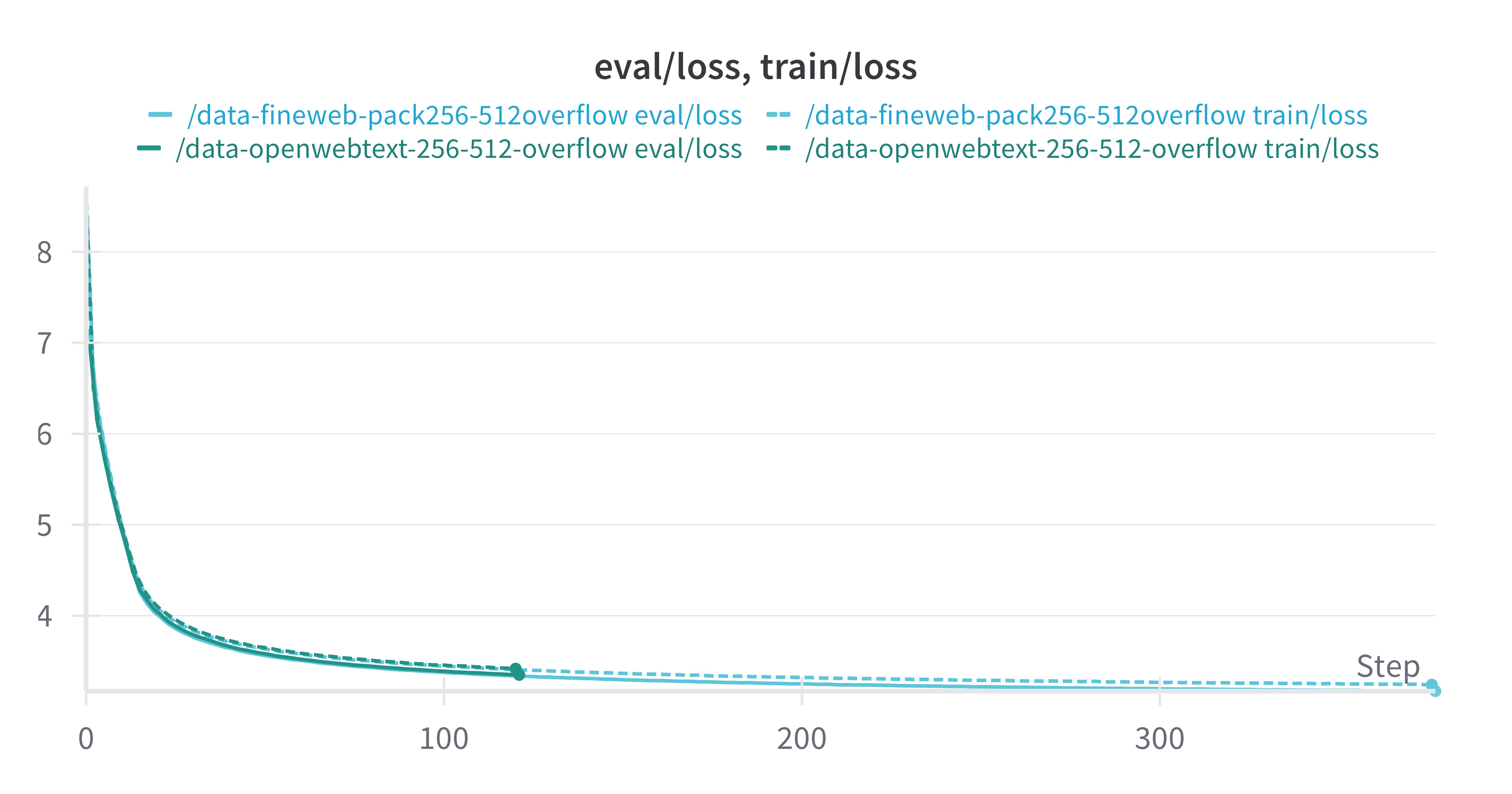
However after 1 epoch of training over the dataset, the model trained on Fineweb-edu performs slightly better than the model trained on OpenwebText, suggesting that Fineweb-edu is better for generalisation to downstream eval tasks.
| Dataset | Tasks | Version | n-shot | Metric | value | StdErr |
| OpenwebText | Hellaswag | 1 | 0 | acc | 0.2745 | 0.0045 |
| Findweb-Edu | Hellaswag | 1 | 0 | acc | 0.2882 | 0.0045 |
Learning Rate: 5e-4 vs 5e-5
Learning rate has a large impact on the model training. The default HuggingFace trainer hyperparameters for learning rate are 5e-5, because it expects fine-tuning as the purpose rather than training from scratch.
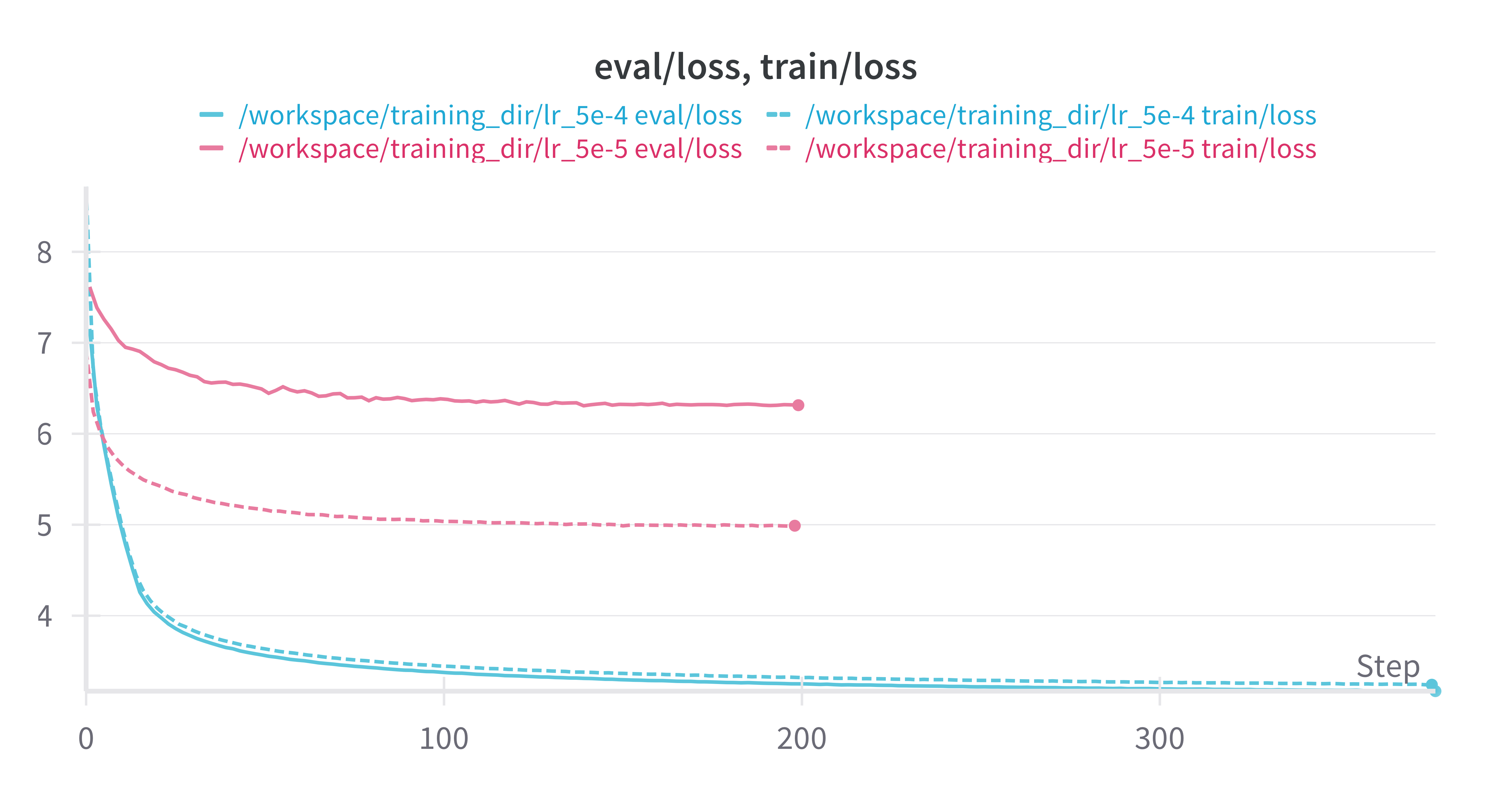
Other hyperparameters related to learning rate such as weight decay, learning rate decay, and learning rate warmup were not critical. I used AdamW as the optimizer.
Tokenizer
The Custom Tokenizer on the Training set achieves much lower loss on the train and dev set than the Pre-trained GPT2 Tokenizer. However, this does not translate into stronger downstream evaluation performance.
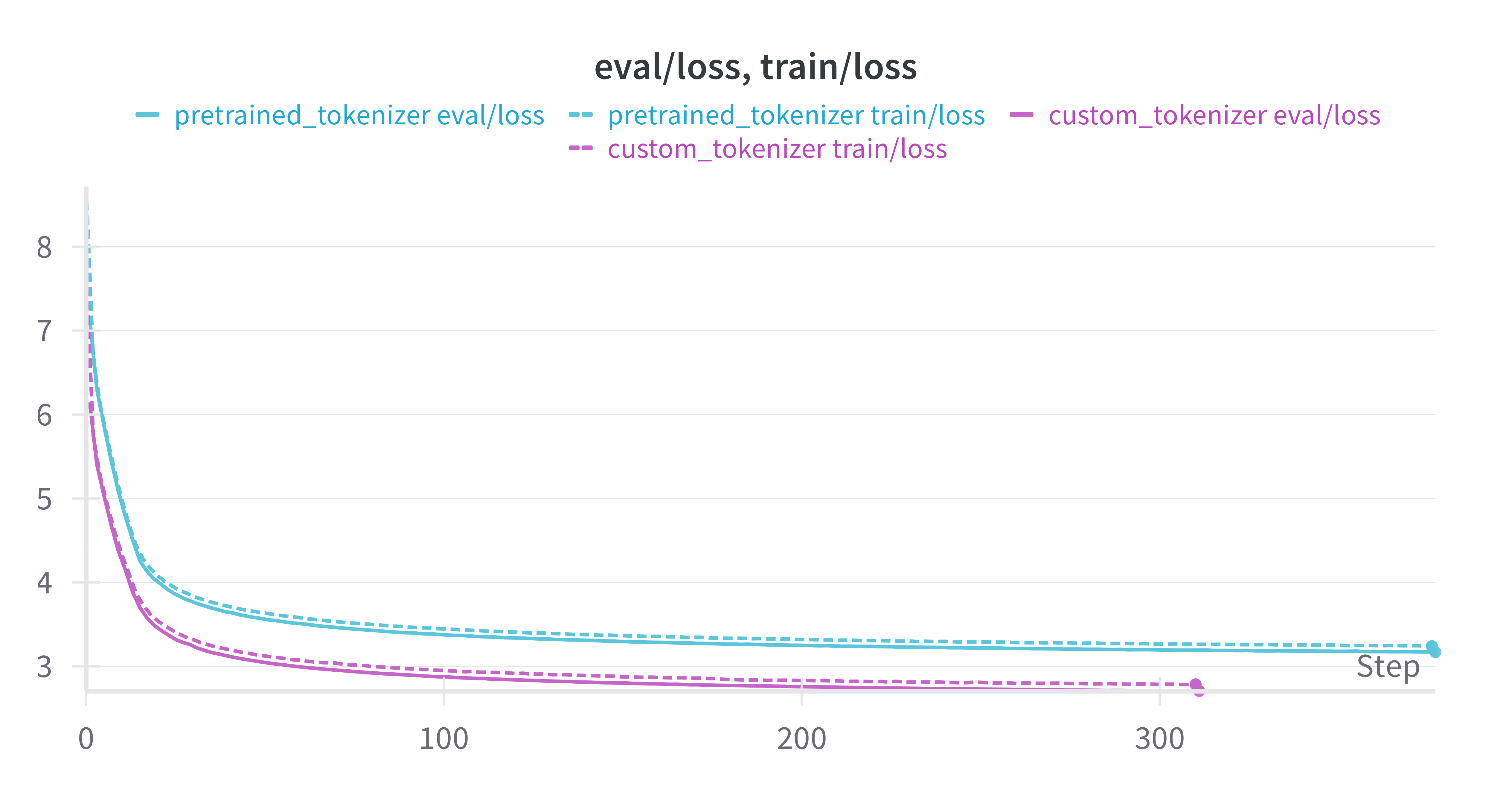
| Dataset | Tokenizer | Tasks | Version | n-shot | Metric | value | StdErr |
| OpenwebText | Pretrained | Hellaswag | 1 | 0 | acc | 0.2745 | 0.0045 |
| OpenwebText | Custom Retrain | Hellaswag | 1 | 0 | acc | 0.2759 | 0.0045 |
Critical Parameters
- The effective total number of tokens per update should be somewhere in the range of (at least) 500k. This is the
effective_tokens = non-padded sequence length * batch size * nGPUs * no. of gradient accumulation steps.
A better way to handle the preprocessing is by wrapping and packing all tokens to the max sequence length like here, but this produces confounds as now sequences may have incorrect prior context due to the packing. Another optimisation is dynamic batching.
- For the effective number of tokens (~500k), the learning rate must be in the range of 5e-4. A learning rate of 5e-3 has very unstable training with large fluctuations in loss, and 5e-5 convergence is very poor.
Key Result
Accuracy on Hellaswag was replicated.
| Model | Dataset | Tokenizer | Tasks | n-shot | Metric | value | StdErr |
| OpenAI | ?? | Pretrained | Hellaswag | 0 | acc | 0.287 | 0.0045 |
| FromScratch | Fineweb-Edu10B | Pretrained | Hellaswag | 0 | acc | 0.2882 | 0.0045 |
| OpenAI | ?? | Pretrained | WikiText | 0 | ppl | 42.5 | N/A |
| FromScratch | Fineweb-Edu10B | Pretrained | WikiText | 0 | ppl | 52.1 | N/A |
(OpenAI - Official Release supported by HuggingFace)
However, wikitext was 10 ppl points off under the same setup in llm-eval with 512 context window. It’s unclear if the difference is due to training dataset or hyperparameters, because we don’t have a different open source replication to compare it against. The only other reliable reproduction (Kaparthy’s llm.c) only reports Hellaswag.